

TUI
Terminal UI entrypoint, worker RPC, OpenTUI renderer, command registry, routes, event streams, and remote control wiring.
Overview
The nikcli terminal UI is the default command registered by
packages/nikcli/src/cli/cmd/tui/thread.ts. It is not only a renderer. The TUI is a
split runtime: the main thread owns terminal input, OpenTUI rendering, dialogs, routes, and
local process lifecycle, while a Bun worker owns the server app, project instances, SDK fetches,
event streams, upgrades, and cleanup.
Default route
The bare nikcli command starts the TUI, resolves the working directory, validates any requested session, and passes initial args into the renderer.
Worker RPC
The worker exposes fetch, server startup, event subscription, reload, upgrade, and shutdown methods through Rpc.client.
OpenTUI renderer
app.tsx builds the Solid provider tree, command registry, route switch, dialogs, plugin routes, and keyboard handling.
SDK surface
The UI talks to the same Hono app as external clients, either through in-process fetch or through an HTTP server when network access is enabled.
Visual tour
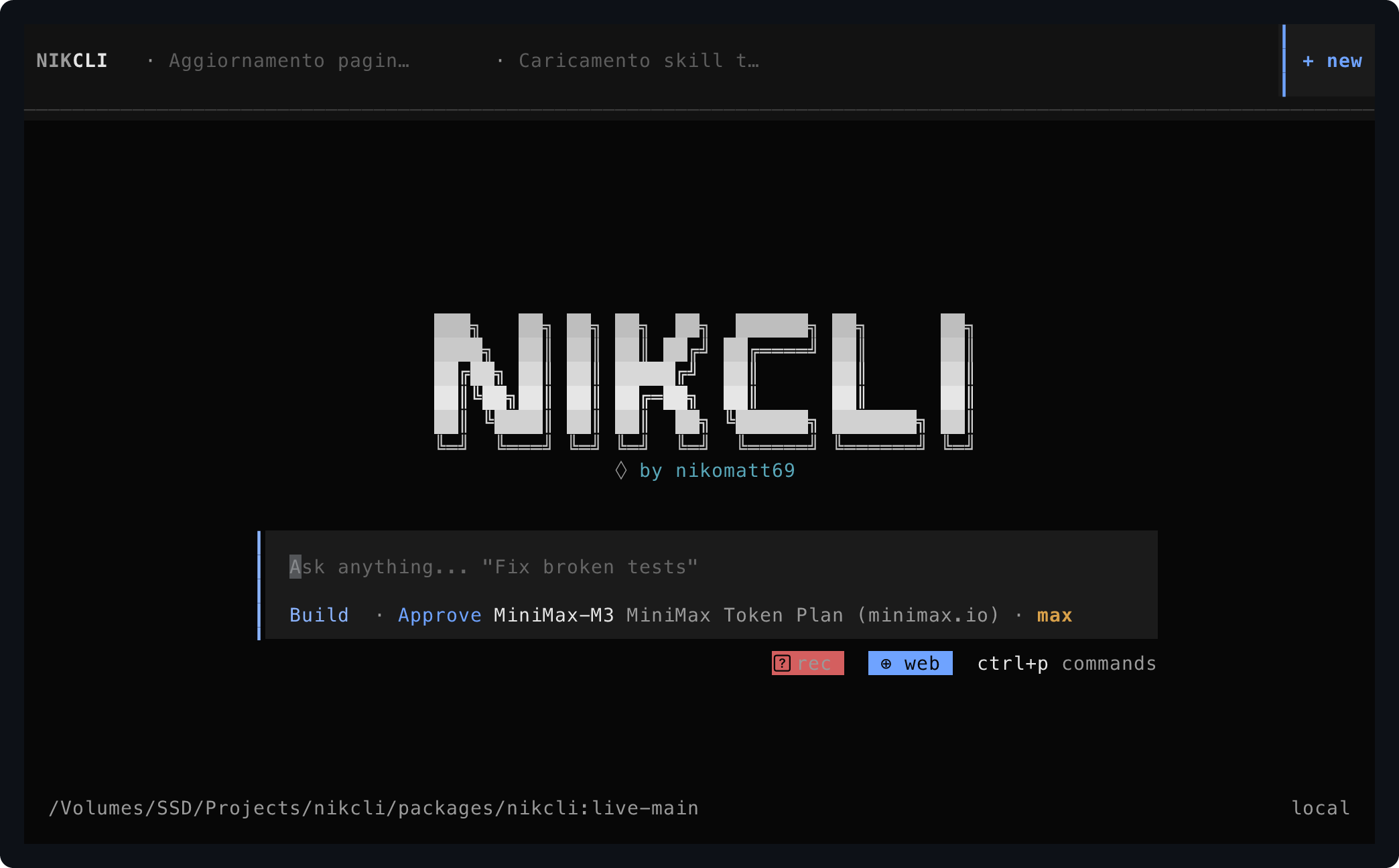
The captures on this page come from two sources: a recorded
bun run --cwd packages/nikcli dev session run through a terminal-control
PTY at 112×34 with the OpenTUI host profile, and live in-session dialogs opened
during real workflows. Bundles, raw .termctrl recordings, accessibility
trees, SVGs, PNGs and manifests live under artifacts/tui/tui-check/; the
same skill powers the terminal-control docs.
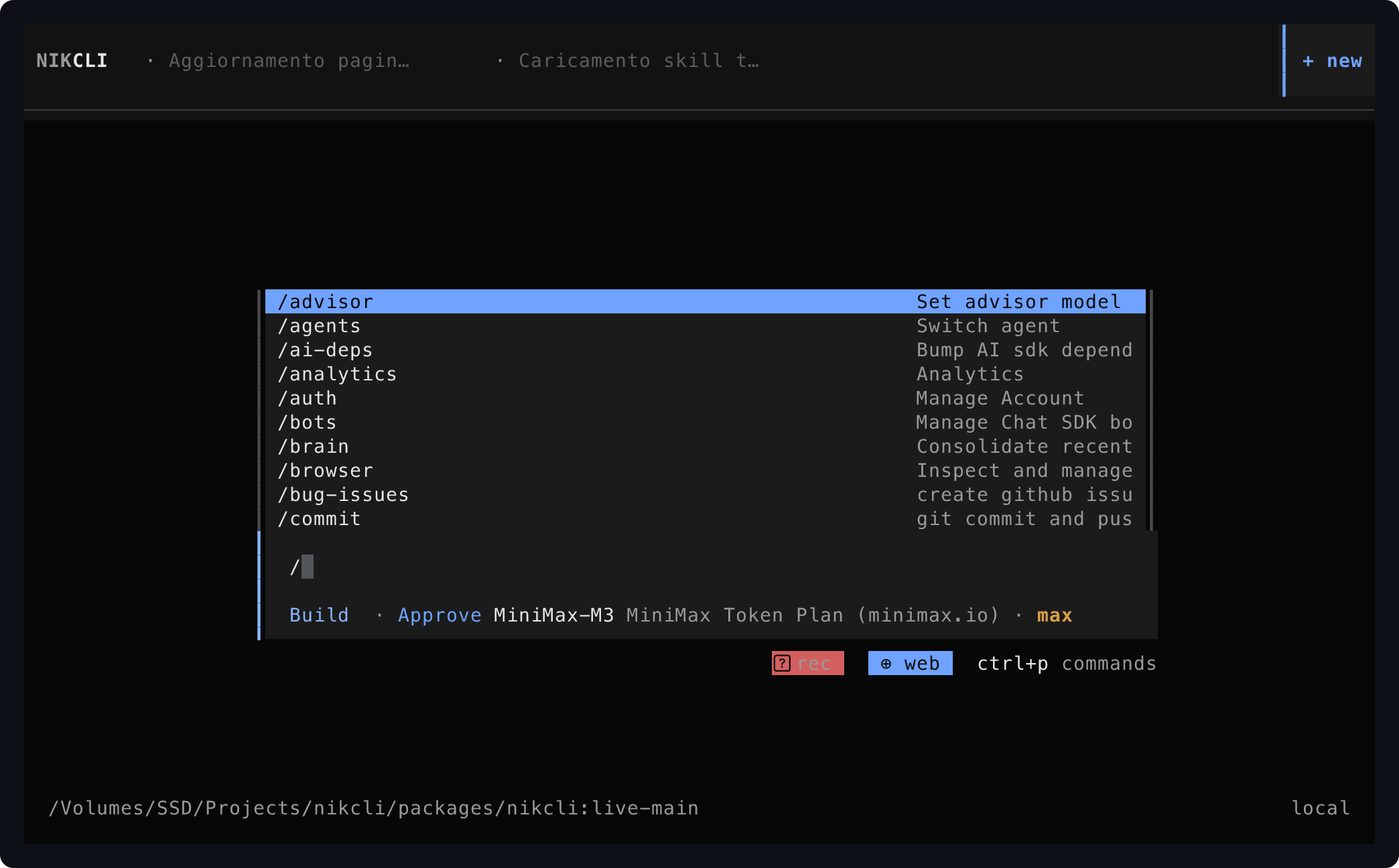
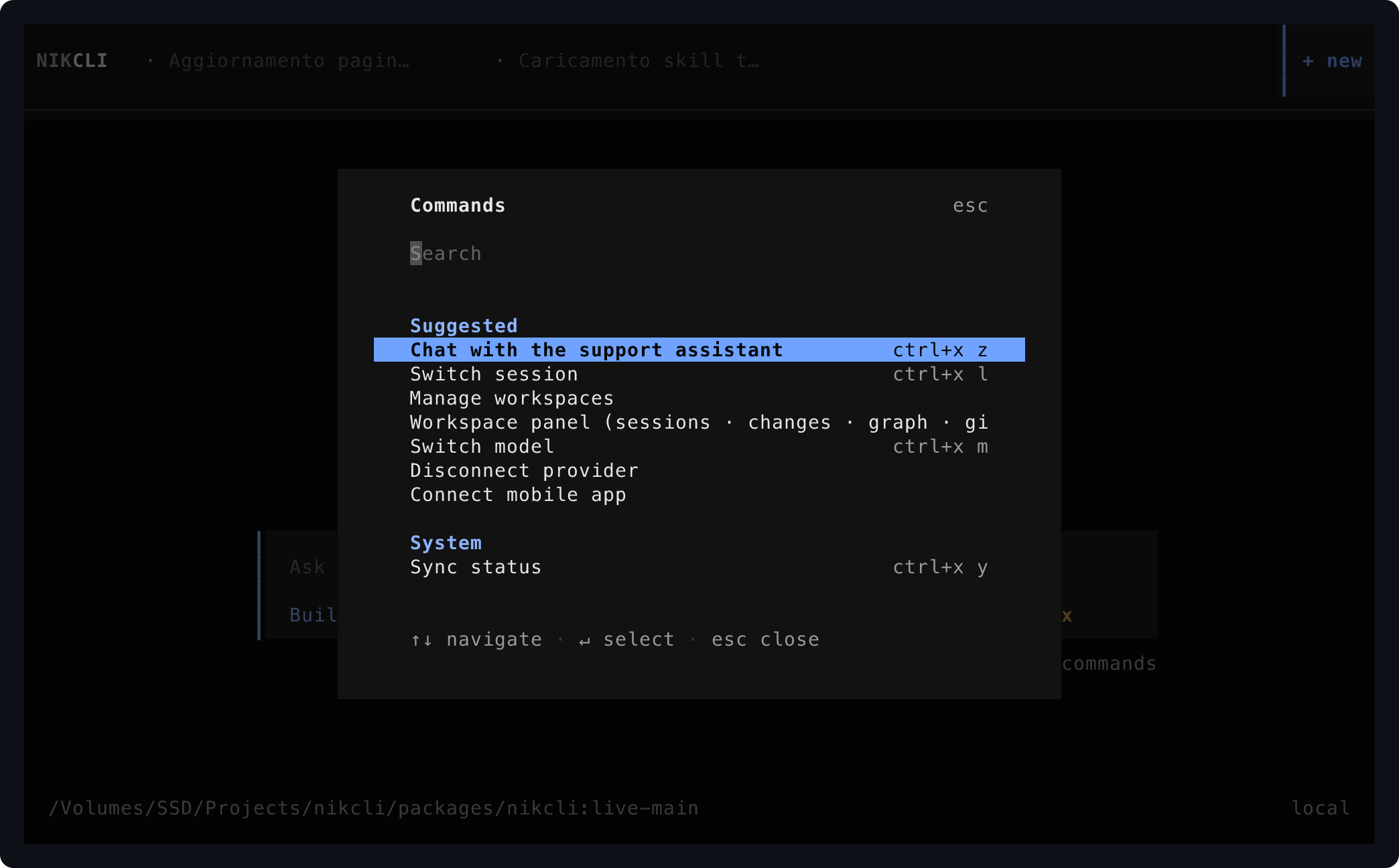
Core shell
Empty home, slash-command autocomplete, and command palette — the surfaces reached before submitting a prompt.
In-app surfaces
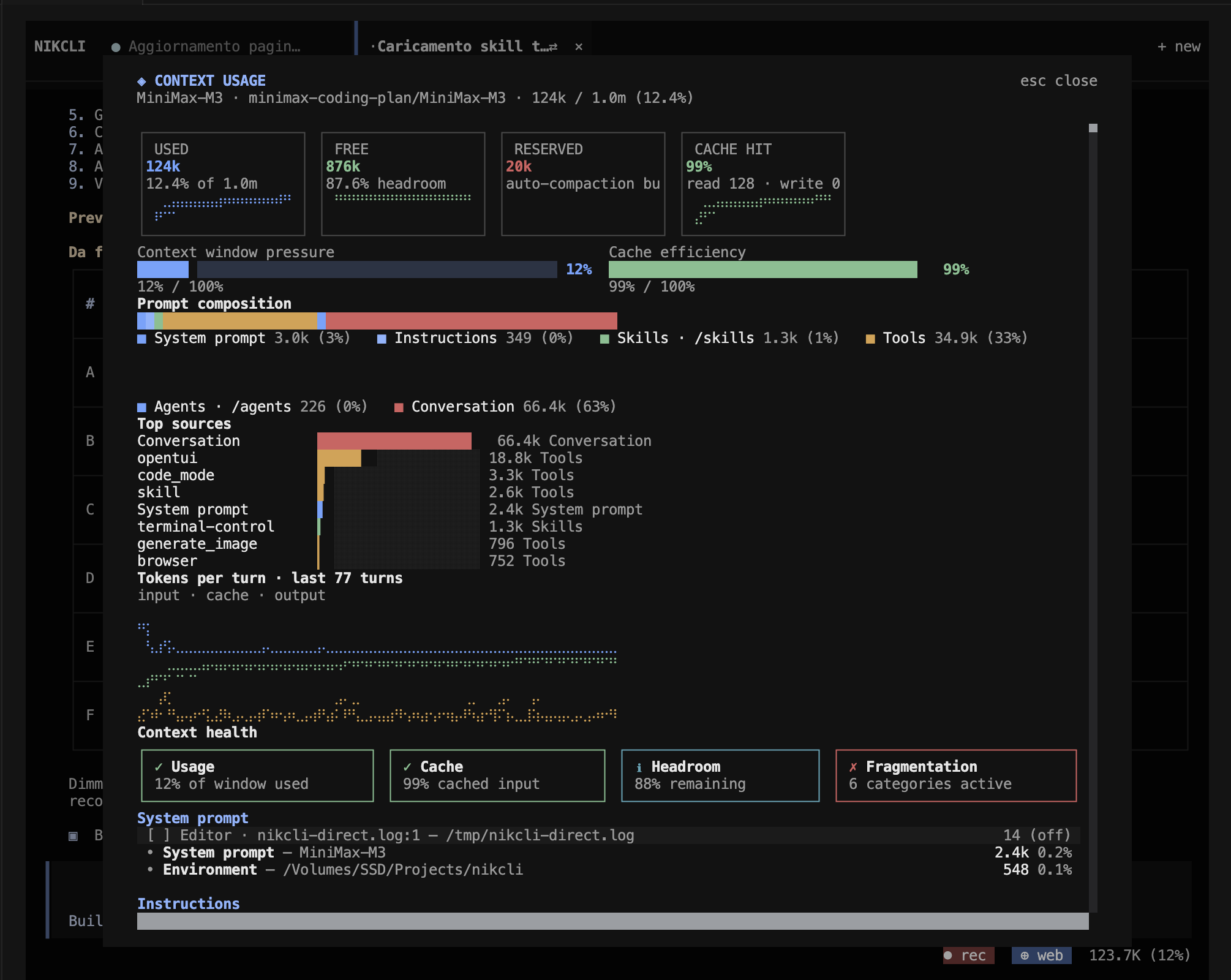
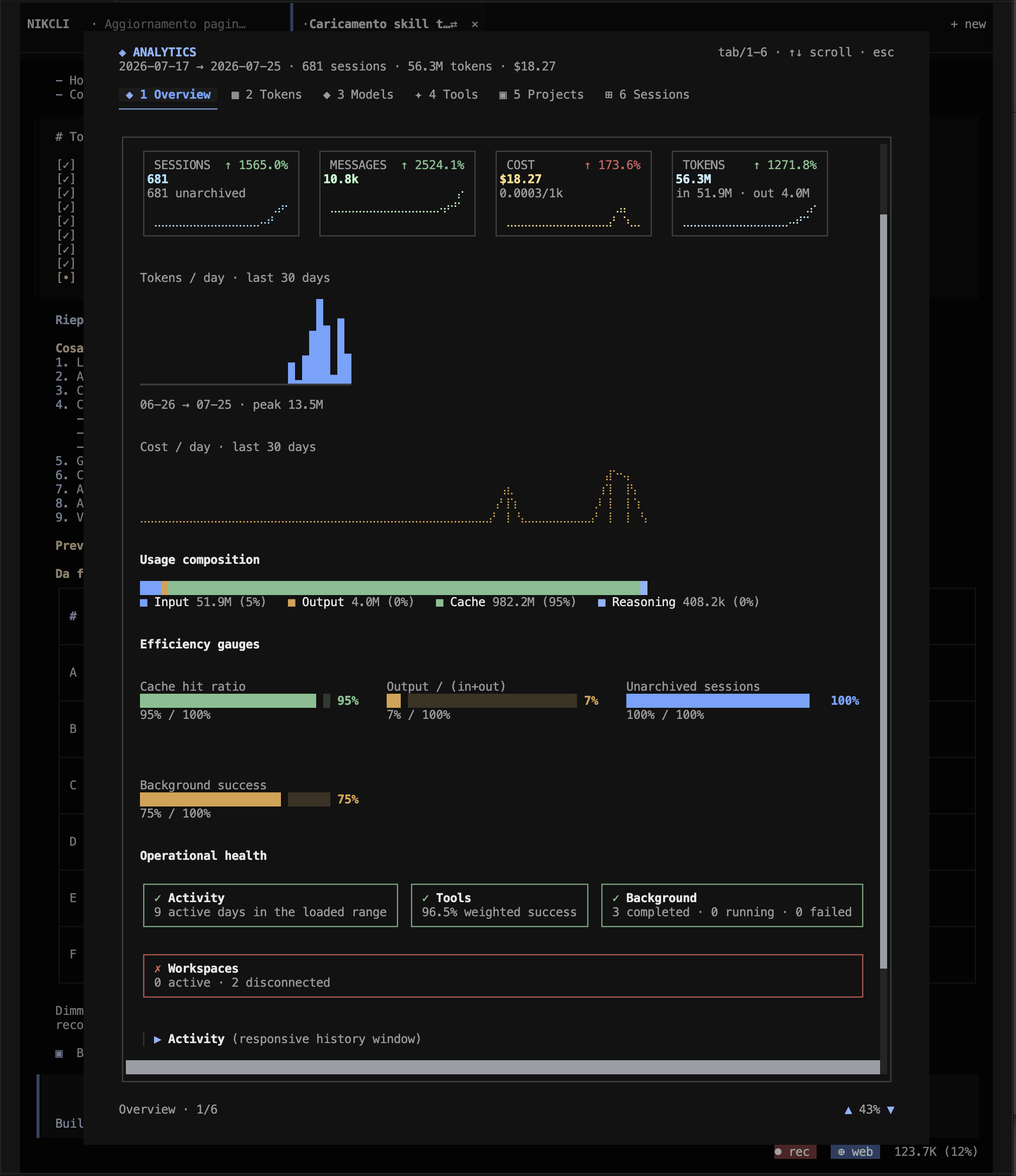
Full-screen dialogs that the TUI renders on top of the shell: context-usage telemetry and analytics with KPIs, charts, gauges, and operational health badges.
Workspace view
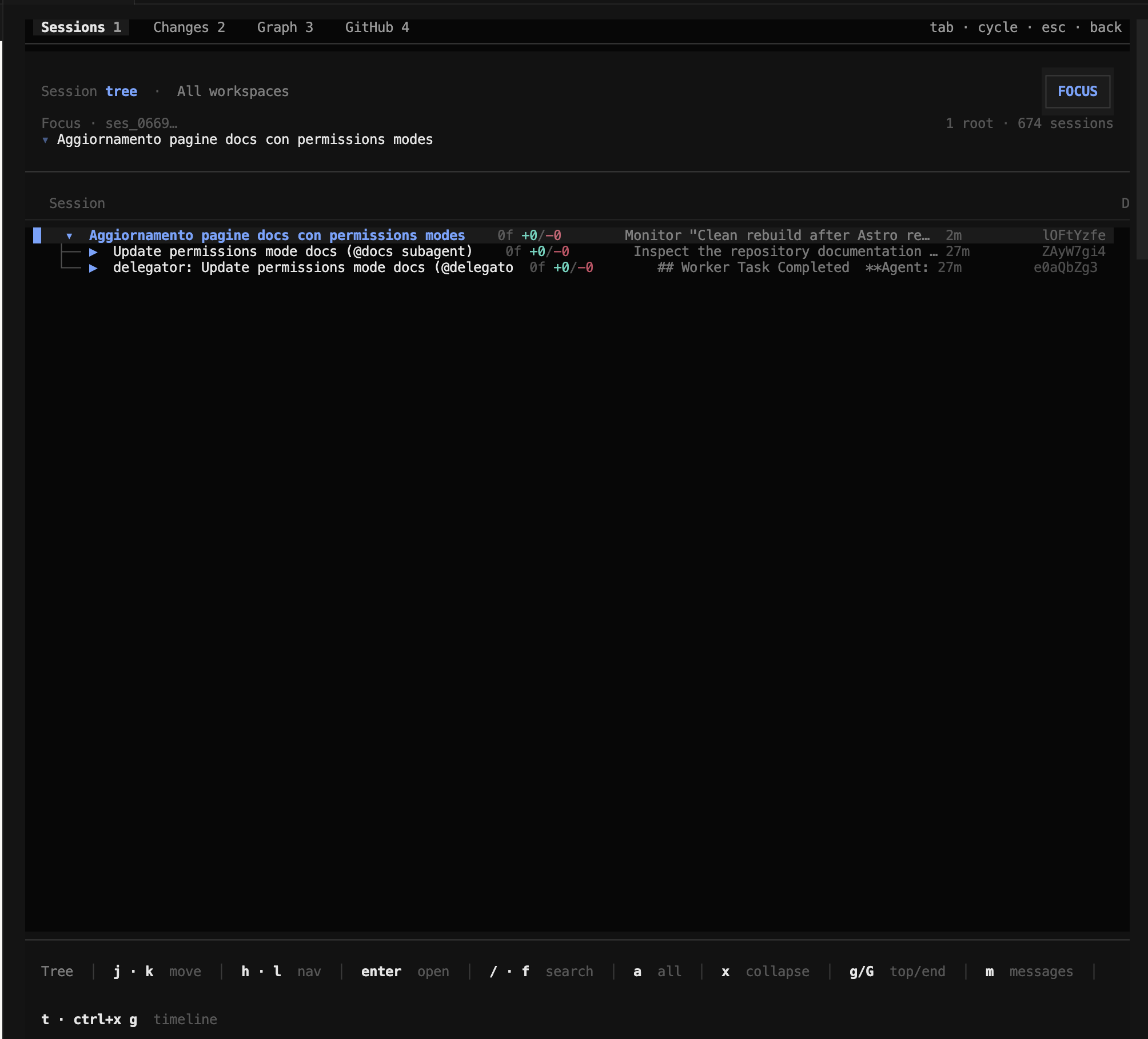
The workspace route (type: "workspace", defined in
context/route.tsx) is a four-tab panel that overlays any session. Each tab is
registered as a hidden command in app.tsx (lines 714–787) and reachable from the
command palette or as a slash command.
| Tab | Slash | Purpose |
|---|---|---|
| Sessions | /tree | Session tree with focus and timeline: shows every session for the active workspace, marks the focused session, and supports the delegated-task hierarchy (root, subagents, plan/decision points). |
| Changes | /changes | Git diff with stage/unstage, file and hunk navigation, commit, push, and PR publish. |
| Graph | /graph · /gitgraph · /commits | Commit graph with log search, branch/lane navigation, and one-key checkout or reset. |
| GitHub | /github · /gh | GitHub integration: PR list, create/merge PR, run workflow, branch protection status. |
Re-run the recorded shell capture with
bun run --cwd packages/terminal-control control -- start tui-check
        --host opentui --cols 112 --rows 34 --record /tmp/tui-check.termctrl
        -- env NIKCLI_TERMINAL=1 bun run --cwd /Volumes/.../packages/nikcli dev
,
then re-bundle per marker:
--at-marker home|slash-menu|palette --result passed ....
Default command
TuiThreadCommand is registered in packages/nikcli/src/index.ts before
the one-shot run command. The command name is $0 [project], which makes it the
default yargs route. It accepts project path, model, continue, session, prompt, and agent
options, plus shared network flags from withNetworkOptions.
| Input | Runtime effect | Source |
|---|---|---|
[project] | Resolved by resolveThreadDirectory; relative paths are based on PWD so shell --cwd behavior stays intact. | thread.ts |
--model | Forwarded into the TUI args context as the initial provider/model selection. | thread.ts, context/args |
--continue | Signals that the UI should continue the latest session instead of starting from an empty home route. | thread.ts, session route code |
--session | Validated with Session.ID.safeParse and sdk.session.get before the renderer starts. | validateSession |
--prompt | Combined with piped stdin when stdin is not interactive, then passed into ArgsProvider. | thread.ts |
--agent | Forwarded into the args context so session startup can select the requested agent. | thread.ts |
--port, --hostname, --mdns | Switch the TUI from in-process RPC transport to a worker-hosted HTTP server. | resolveNetworkOptions |
Mobile and nikcli-managed PTYs set NIKCLI_TERMINAL=1. The TUI treats that as an
interactive terminal even if Bun reports stdin.isTTY as false, avoiding the
piped-stdin path that would otherwise block renderer startup.
Worker model
The main process chooses NIKCLI_WORKER_PATH, the built worker file, or the local
TypeScript worker source. It then starts a Bun Worker with a sanitized environment
where Process.ROLE_ENV is worker and a run id is guaranteed. The worker
calls Process.ensureMetadata("worker"), initializes logging, listens for global
bus events, and exposes an RPC object.
| RPC method | Purpose | Operational detail |
|---|---|---|
fetch | Runs SDK requests against Server.App().fetch. | Adds Basic Auth from server flags when configured and returns status, headers, and text body. |
server | Starts or restarts a Bun Hono server from the worker. | Stops the old server before replacing it; returns the concrete URL. |
subscribe | Starts an event stream for a project directory. | Creates an SDK client against http://nikcli.local using worker-local fetch and emits each event back through RPC. |
unsubscribe | Stops a worker event stream. | Aborts the matching stream controller and removes it from the stream map. |
checkUpgrade | Runs passive upgrade checks after the renderer starts. | Executes inside Instance.provide for the current directory. |
upgradeNow | Runs an explicit upgrade requested by the TUI. | Delegates to upgradeNow(method, version) inside the project instance. |
reload | Disposes all project instances after SIGUSR2. | Used by development reload flows. |
shutdown | Stops event streams, disposes instances, and stops the HTTP server. | The main thread waits up to five seconds before terminating the worker. |
The TUI does not rely on worker process exit for cleanup. onExit calls worker
shutdown, onBeforeExit disposes TUI plugin runtime state, and the main thread
terminates the worker only after the RPC shutdown path returns or times out.
Transport modes
The TUI has two runtime transports. Both use the generated SDK surface, but they differ in how requests and events reach the server app.
| Mode | When used | Fetch path | Event path |
|---|---|---|---|
| Direct worker transport | No explicit port, hostname, mdns, or non-local configured server values. | createWorkerFetch forwards the request over RPC to worker.fetch. | createEventSource subscribes through worker RPC and receives event emissions. |
| Worker HTTP server | Network options request an externally reachable server. | The SDK uses normal fetch against the returned HTTP URL. | SDKProvider opens server SSE through sdk.event.subscribe. |
Even when the TUI starts in direct mode, the session UI can later call the
startServer callback. That asks the worker to bind a local server on port
0 and returns the URL for local share or preview flows.
Renderer tree
packages/tui/src/app.tsx creates an OpenTUI renderer with a 45 FPS
target, Kitty keyboard support, mouse support from TUI config, copy selection handling, and
explicit Ctrl-C behavior. The Solid app is mounted inside an error boundary and a deep provider
stack.
| Provider group | Purpose |
|---|---|
ArgsProvider, ExitProvider, ServerProvider | Expose command args, restart/exit hooks, server startup, and plugin disposal on exit. |
SDKProvider, ProjectProvider, SyncProvider | Create the SDK client, subscribe to project/server events, and keep synchronized runtime state. |
AnalyticsProvider, KVProvider, LocalProvider | Expose usage, local preferences, model favorites, and small local state to routes and dialogs. |
ThemeProvider, KeybindProvider, AttentionProvider | Apply terminal palette mode, user keybinds, and attention/notification handling. |
DialogProvider, CommandProvider, ToastProvider | Manage dialogs, slash commands, keyboard command triggers, and toast rendering. |
PromptHistoryProvider, PromptStashProvider, PromptRefProvider | Power prompt history, frecency, stash, and imperative prompt operations. |
EditorContextProvider, UpgradeProvider | Expose editor integration state and interactive upgrade actions. |
Feature plugins
Almost every surface the TUI shows — home tips, sidebar panels, the plugin manager,
the wallpaper, the loop and mission managers — is a self-contained feature plugin
under packages/tui/src/feature-plugins/, loaded through the
same runtime that loads third-party plugins from npm. The larger ones follow the same
layout: store.ts for reactive state, sdk.ts for typed SDK
bindings, runner.ts for the local control plane, and dialogs.tsx
for the Solid components.
| Plugin | Purpose |
|---|---|
home | Rotating tip line in the home.bottom slot, plus the tips.toggle command. |
sidebar | Six independent slot plugins: context/cost, MCP, LSP, todo, modified files, and the footer. |
system | The plugin manager (list, toggle, install) and the OpenRouter Fusion preset manager. |
background | Paints a real image behind the TUI via OpenTUI's native half-block super-sampler; owns /background. |
loops | Loops manager, creation wizard and live sidebar. Mirrors the loop SDK contract. |
mission | Missions manager, planning wizard and live sidebar. Mirrors the mission SDK contract. |
brain | Arms the Brain consolidation scheduler and registers /brain for an on-demand pass. |
browser | Browser-use control surface for the browser tool (page navigation, snapshots, action log). |
chatbot | Chat SDK bots — start/stop per platform and show the webhook path each one must be pointed at. |
computer | Probes the host and reports what the computer tool can do on this machine. |
connectors | Live connector health, cache invalidation, and stored-credential removal inside the TUI. |
observability | Live OpenTelemetry spans and OTLP endpoint dialogs (see Observability). |
island | Toggles the macOS Island notch integration for the current TUI session. Registered only under --island. See Island plugin below. |
Each plugin's commands, slash aliases, KV keys and internals are documented in TUI feature plugins.
Plugins register commands, routes, dialogs, keybinds, and sidebar / status slots through
packages/tui/src/plugin/api.tsx. Runtime cleanup runs on exit through
TuiPluginRuntime.dispose() — plugins should not rely on process exit for
teardown.
Dialogs
All dialogs live in packages/tui/src/component/ and are
registered through the DialogProvider and the command palette. The full list
(in addition to those in the top-level README):
| Dialog | Source | Purpose |
|---|---|---|
dialog-telemetry-live | dialog-telemetry-live.tsx | Scrolling, filterable list of live OpenTelemetry spans (see Observability). |
dialog-opentelemetry | dialog-opentelemetry.tsx | OTLP configuration dialog: shows the resolved endpoint, the resource block, and a "Copy as env" action. |
dialog-advisor-model | dialog-advisor-model.tsx | Pick the model used by the advisor tool. |
dialog-browser-use | dialog-browser-use.tsx | Browser-use control surface: live snapshot, navigation, action log for the browser tool. |
dialog-routine | dialog-routine.tsx | Routine create/edit dialog backed by the routine SDK. |
dialog-session-warp | dialog-session-warp.tsx | Quick-jump to another session by fuzzy match. |
dialog-session-rename | dialog-session-rename.tsx | Rename the active session. |
dialog-session-delete-failed | dialog-session-delete-failed.tsx | Confirmation when a session delete failed and the local cache is stale. |
dialog-mobile-connect | dialog-mobile-connect.tsx | Show a pairing QR code and bearer token, plus copy-to-clipboard, from inside the TUI. |
dialog-sync | dialog-sync.tsx | Sync status, hub URL/token config, autostart toggle, and reconnect. |
dialog-teleport | dialog-teleport.tsx | Pick a session and remote target, then ship the session through nikcli teleport. |
dialog-workspace-create | dialog-workspace-create.tsx | Create a new multi-project workspace. |
dialog-workspace-list | dialog-workspace-list.tsx | Switch between workspaces. |
dialog-workspace-unavailable | dialog-workspace-unavailable.tsx | Show the error that prevents entering a workspace. |
dialog-workspace-file-changes | dialog-workspace-file-changes.tsx | Aggregate file changes across the workspace's projects. |
plugin-route-missing | plugin-route-missing.tsx | Rendered when a TUI plugin navigates to a route id that is not registered. Offers a "go home" action instead of crashing. |
Routes
The TUI route state lives in context/route.tsx. It is a Solid store initialized
from NIKCLI_ROUTE when present, otherwise from the home route. Route changes are
in-memory UI navigation, not browser history.
| Route type | Fields | Used for |
|---|---|---|
home | initialPrompt, workspaceID | Default landing route and empty prompt state. |
session | sessionID, initialPrompt, workspaceID | Main transcript and prompt view for one session. |
workspace | tab, sessionID, workspaceID | Unified workspace panel with tree, changes, graph, and GitHub tabs. |
tree, changes, git-graph, github | sessionID, workspaceID | Legacy route shapes redirected into the workspace view when needed. |
plugin | id, data, workspaceID | TUI plugin routes registered through the plugin runtime. |
The app keeps a mutable plugin route map and a reactive route key. When plugin routes change,
the key is bumped so the route switch re-renders. Missing plugin routes render
PluginRouteMissing with a home navigation action instead of crashing the TUI.
Commands and keybinds
CommandProvider owns the command registry. Components register command options with
titles, descriptions, optional keybind names, optional slash aliases, categories, visibility,
and an onSelect callback. The registry deduplicates by category plus value, merges
local and global registrations, and exposes command palette, slash, and trigger APIs.
| Mechanism | Behavior |
|---|---|
| Command palette | The configured command_list keybind opens a DialogSelect of visible commands. |
| Direct keybinds | The provider listens to keyboard events, skips disabled commands and active dialogs, and calls the matching command callback. |
| Slash commands | Visible command options with slash metadata become prompt slash entries with aliases. |
| Programmatic trigger | command.trigger(name) runs the matching command; TUI HTTP events use this path. |
| Suspension | keybinds(false) increments a suspend counter so dialogs or text inputs can temporarily suppress command shortcuts. |
| Permission mode keybind | The permission_mode command opens DialogPermissionMode — see Permission modes. It applies the selected preset (require_approval / approve_for_me / full_access) to the current primary agent. |
| Session dialogs | Context usage (/usage or /context) opens DialogUsage; Analytics (/analytics or /stats) opens DialogAnalytics. See Dialogs for screenshots. |
Dialogs
The TUI ships a few session-scoped dialogs that are useful to keep open while running long work. They are reachable from the command palette and as slash commands.
Context usage
DialogUsage (app.tsx line 1074) shows how the active session is
spending its 1.0 M-token context window. The dialog breaks the window into used / free /
reserved slices, plots a tokens-per-turn sparkline over the last 77 turns, surfaces the top
token sources (system prompt, tools, skills, conversation, plus per-tool contributions from
opentui, terminal-control, generate_image,
browser, etc.), and ends with a four-card Context health strip
(Usage, Cache, Headroom, Fragmentation).
Analytics
DialogAnalytics (app.tsx line 1086) is a 6-tab dashboard loaded
through AnalyticsProvider against the host's /analytics/* HTTP
endpoints. The Overview tab shows sessions, messages, cost, tokens with deltas vs. the prior
window, the last-30-day token and cost histograms, the usage-composition stack
(input / output / cache / reasoning), and the four-card Operational health strip
(Activity, Tools, Background, Workspaces). Tabs 2 Tokens,
3 Models, 4 Tools, 5 Projects,
6 Sessions drill into each slice; cycle with tab or
1–6.
Event flow
SDKProvider creates a generated SDK client and an event emitter keyed by event
type. It batches event delivery inside Solid batch calls, flushing immediately
unless another flush happened in the last 16 milliseconds.
- Direct mode passes a custom
EventSourcefromthread.ts; the worker opens the SDK event stream and emits events over RPC. - HTTP mode calls
sdk.event.subscribedirectly and retries with exponential backoff from 250 ms to 5 seconds. - Queueing batches received events to keep bursty server updates from forcing one render per event.
- TUI commands listen for
tui.command.execute,tui.toast.show, andtui.session.selectevents and map them to local UI actions. - Cleanup aborts the SDK signal, active SSE controller, and pending flush timer on provider unmount.
| TUI event | Payload | Local action |
|---|---|---|
tui.prompt.append | text | Append text to the active prompt. |
tui.command.execute | command | Trigger a registered command such as session list, submit prompt, page up, compact, or agent cycle. |
tui.toast.show | title, message, variant, duration | Render an info, success, warning, or error toast. |
tui.session.select | sessionID | Navigate to the requested session after the server validates it exists. |
The session sync layer replays missed events for every workspace when the TUI starts or reconnects, so per-project state is identical to the server at render time.
Island plugin
The Island plugin is the CLI-side mirror of the macOS NikcliIsland.app notch
UI. It writes a per-session JSON snapshot under
~/Library/Application Support/NikcliIsland/state.d/ on every relevant event,
and the native app polls that directory to render live session state without keeping a
separate IPC channel.
The bridge lives in @nikcli-ai/util/island-bridge and is
self-activating: Bus.publish itself calls start() on first
publish (idempotent, no-op after the first real call). That matters because the TUI's real
session / bus activity runs inside a Worker thread with isolated module state —
a listener registered only in the parent process would never see those events.
| State | Source | Display |
|---|---|---|
idle | session.status → idle | Empty pill on the notch. |
thinking | session.status → busy / retry | "Thinking…" or "Retrying (N)…". |
tool | message.part.updated tool status | Friendly label plus file basename, lingers for ~1.9 s after completion. |
permission | permission.asked | "Awaiting permission" + the request id for one-tap approval. |
error | session.error | "Error" pill. |
done | (reserved) | Used by the native app to mark a completed row before archival. |
Each snapshot also carries the parent session id, agent title, project, cwd, the
process pid, the local server port (when one is running), and a server URL — enough for
the native app to call POST /permission/:requestID/reply directly when you
approve a pending request from the notch.
# Inspect Island state
cat ~/Library/Application\ Support/NikcliIsland/state.d/nikcli-ses_abc.json

# Disable Island for this run without uninstalling the app
NIKCLI_ISLAND_DISABLE=1 nikcli
Island is a no-op on Windows and Linux: the native app is a macOS-only notch UI. The
NIKCLI_ISLAND_TEST_FORCE_DARWIN=1 flag exists only for the bridge's own
test suite — never set it in production.
The Island feature plugin's activate / deactivate calls
IslandBridge.setEnabled() — toggling off clears the current snapshots and
stops writing, toggling back on resumes through the already-registered listener without
any race window.
HTTP control routes
packages/nikcli/src/server/httpapi/tui.ts exposes routes that remote clients,
companion surfaces, and automation can use to nudge the running TUI. Most routes publish a
typed TuiEvent onto the bus. /tui/control is a queue bridge for
request/response handoff.
| Route | Publishes or returns | Use |
|---|---|---|
POST /tui/append-prompt | TuiEvent.PromptAppend | Append text into the active prompt input. |
POST /tui/open-help | help.show | Open the help dialog. |
POST /tui/open-sessions | session.list | Open session selection. |
POST /tui/open-themes | theme.switch | Open theme selection. |
POST /tui/open-models | model.list | Open model selection. |
POST /tui/submit-prompt | prompt.submit | Submit the current prompt. |
POST /tui/clear-prompt | prompt.clear | Clear prompt input. |
POST /tui/execute-command | Mapped command name | Translate legacy remote names such as agent_cycle into current command ids. |
POST /tui/show-toast | TuiEvent.ToastShow | Show a notification in the terminal. |
POST /tui/publish | Any typed TuiEvent | Generic event publish endpoint with zod validation. |
POST /tui/select-session | TuiEvent.SessionSelect | Validate a session through Session.Service, then navigate the TUI. |
GET /tui/control/next | Queued TUI request | Pull the next queued control request. |
POST /tui/control/response | true | Push the response for a pending queued request. |
Config and plugins
TUI-specific configuration is loaded by packages/nikcli/src/config/tui.ts. The
loader reads global config directory files, NIKCLI_TUI_CONFIG, project TUI files,
.nikcli config directories, and managed config. It migrates old TUI config, flattens
nested tui objects, parses keybinds, deduplicates plugin specs, and records plugin
metadata with local or global scope.
| Config area | Runtime use |
|---|---|
mouse | Controls OpenTUI mouse support; defaults to enabled. |
keybinds | Parsed through shared config keybind parsing and consumed by KeybindProvider. |
scroll_speed, scroll_acceleration | Consumed by session route scroll logic. |
diff_style | Used by session permission and diff rendering components. |
plugin | Feeds TuiPluginRuntime.init through createTuiApi. |
plugin_meta | Records whether each plugin came from local or global config and the source file. |
The TUI plugin API can register commands, plugin routes, and UI contributions. Runtime cleanup
is tied to exit through TuiPluginRuntime.dispose(), so plugins should not depend on
process exit for teardown.
Remote and attach
The TUI can either host its own local server for external access or attach to an existing
server. nikcli attach <url> calls the same tui renderer with the
provided URL instead of starting a local worker server. Remote Control uses TUI commands and
server routes to drive the active prompt, sessions, scrolling, compacting, sharing, and
interruption flows.
nikcli --port 4096 --hostname 127.0.0.1
nikcli attach http://127.0.0.1:4096
curl -X POST http://127.0.0.1:4096/tui/open-sessions
curl -X POST http://127.0.0.1:4096/tui/execute-command -H 'content-type: application/json' -d '{"command":"agent_cycle"}' nikcli companion serve and nikcli companion open start the desktop
browser companion surface. It connects to the same server/event model, but it is not the
terminal renderer and it is distinct from the mobile host.
Operational checks
Use these checks when debugging TUI startup, remote control, or event delivery.
NIKCLI_TERMINAL=1 bun run dev
nikcli --print-logs --log-level DEBUG
nikcli --port 0 --hostname 127.0.0.1
nikcli attach http://127.0.0.1:4096
curl -i http://127.0.0.1:4096/global
curl -i -X POST http://127.0.0.1:4096/tui/open-help| Check | What it proves |
|---|---|
| Start without network flags | Direct worker fetch and worker event subscription work. |
Start with --port | Worker server startup, HTTP fetch, and server-side SSE work. |
Call /tui/open-help | HTTP route can publish a TUI command event and the renderer is subscribed. |
Call /global | Server auth, request middleware, and basic SDK reachability are healthy. |
Use SIGUSR2 | Worker reload disposes project instances without restarting the renderer process. |
Failure modes
| Symptom | Likely cause | Fix |
|---|---|---|
| TUI hangs before drawing | Bun reports non-TTY stdin and no NIKCLI_TERMINAL=1, so the command is waiting for piped stdin. | Run from an interactive terminal, set NIKCLI_TERMINAL=1 for managed PTYs, or provide stdin intentionally. |
| Session id rejected before UI starts | --session failed schema parsing or sdk.session.get returned an error. | Use a valid ses... id from nikcli session list and confirm the data root/project matches. |
| Remote button does nothing | The TUI is in direct mode and no local HTTP server has been started yet, or the server callback failed. | Start with --port or trigger the on-demand local server path and inspect worker logs. |
| HTTP TUI route returns true but UI does not change | The server published the event, but the renderer SDK event subscription is disconnected. | Check SSE reconnect logs, server auth flags, and whether the TUI is attached to the same server URL. |
| Keyboard shortcut ignored | A dialog or text input has suspended command keybinds, or the command is disabled for the current route. | Close the dialog, check route-specific command registration, and inspect TUI keybind config. |
| Plugin route missing | A plugin navigated to a route id that is not registered in the current plugin route map. | Verify the TUI plugin was loaded from config and registered its route before navigation. |
| Worker does not exit cleanly | A server, event stream, or instance finalizer is still shutting down after the five-second timeout. | Inspect worker logs and confirm server/event streams stop through shutdown. |
Source anchors
| File | What to inspect |
|---|---|
packages/nikcli/src/cli/cmd/tui/thread.ts | Default command, worker startup, network mode selection, session validation, prompt input, restart, and shutdown. |
packages/nikcli/src/cli/cmd/tui/worker.ts | RPC server, worker fetch, event stream bridge, server startup, reload, upgrade, cleanup, and IslandBridge.stop(). |
packages/tui/src/app.tsx | OpenTUI renderer config, provider tree, route rendering, dialogs, command registration, plugin runtime, and event handlers. |
packages/tui/src/context/sdk.tsx | SDK client creation, direct event source support, SSE retry loop, event batching, and cleanup. |
packages/tui/src/context/route.tsx | Route shapes, route store initialization from NIKCLI_ROUTE, navigation, and override provider. |
packages/tui/src/context/remote-sync.tsx | Remote sync state and stats used by the sync dialog. |
packages/tui/src/component/dialog-command.tsx | Command registry, slash command projection, keybind handling, suspension, and palette dialog. |
packages/tui/src/component/dialog-sync.tsx | Sync dialog: URL / token config, autostart toggle, reconnect. |
packages/tui/src/component/dialog-teleport.tsx | Teleport dialog: pick a session and remote target, then ship it. |
packages/tui/src/component/dialog-mobile-connect.tsx | Pairing QR + bearer token from inside the TUI. |
packages/tui/src/component/dialog-browser-use.tsx | Browser-use control surface for the browser tool. |
packages/tui/src/event.ts | Typed TUI bus events and zod payload schemas. |
packages/nikcli/src/server/httpapi/tui.ts | Remote TUI control HTTP routes and queue bridge. |
packages/nikcli/src/config/tui.ts | TUI config loading, migration, keybind parsing, plugin deduplication, and plugin metadata. |
packages/nikcli/src/cli/cmd/tui/attach.ts | Attach command path for connecting the renderer to an existing server URL. |
@nikcli-ai/util/island-bridge | Island file-contract writer, setEnabled, and shutdown semantics. |
packages/tui/src/feature-plugins/island/index.tsx | TUI-side Island plugin (activate / deactivate the bridge). |